Overview
Project
A project is the basis for all live audio/video workflows in Cloudmix. Projects are node-based, where connections between these nodes (called components) are defined by links. The components and links are described by the Workflow.
When a project is started, the region cannot be overridden. See Workflow Sessions for more information about launching projects.
Workflow
A workflow is a set of components containing pads (input and/or output), which are joined via links:
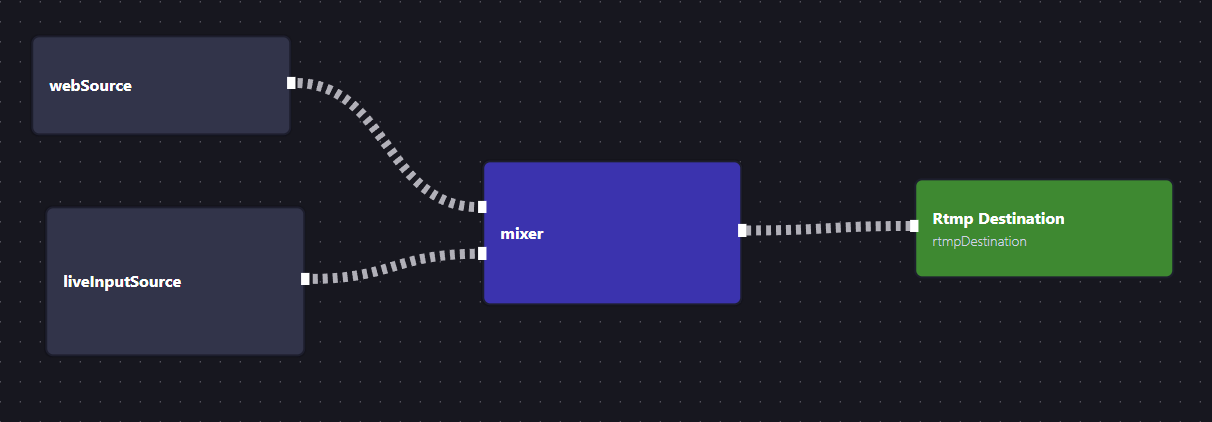
Component types available (for a full description see the API documentation):
mixer: An audio/video mixer with dynamic inputs and a single output. Each input can be positioned arbitrarily within the mixer frame (or hidden), and audio can be individually controlled per input.contributor: A WebRTC lobby with dynamic inputs and outputs. This provides a way to not only monitor streams, but also contribute streams back into the project (via WebRTC). The contributor component is perfect as a remote commentary solution. Contributor lobbies can be either private (behind Cloudmix authentication) or public (with a unique link and optional password).testSource: A single-output component that generates a test pattern and test tone.webSource: A single-output component that renders a web page stream (with audio) at the workflow session framerate.liveInputSource: A single-output component that contributes a stream from a Cloudmix Live Input.imageSource: A single-output component that contributes an image frame.liveOutput: A single-input component that sends a stream to an RTMP or SRT endpoint.
Links are created with a source and a target. The source defines the pad that is generating the stream, and the target defines the consumer pad. Both source and target are defined by a componentId and a padName. The link will be activated when both the component and its pad are available.
Workflow Sessions
Workflow sessions represent a running project. Starting a project creates a Workflow Session on a piece of infrastructure (called an "engine"), with the possibility of overriding the default region at launch time.
Typically, a workflow session will be ready in 2-5 minutes after start is requested, depending on region and infrastructure availability.